
Finding fresh video ideas can feel like pulling teeth, especially when you run a lean operation. The good news? AI can hand you a steady stream of topics, titles, and even script outlines in seconds. In this guide you’ll see eight AI tools that speak the language of small‑business owners, learn how each one fits into a real‑world workflow, and walk away with a cheat sheet you can start using today.
We’ll walk through what each platform does, where it shines, and how you can pair it with your existing workflow to get more clicks, longer watch time, and a healthier bottom line.
1. AI Idea Generator, Quick keyword‑rich ideas
The AI Idea Generator blends keyword research with trend data pulled from millions of online video uploads. Type a seed keyword, say “artisan coffee”, and the tool spits out a list of video concepts that already have a proven search demand.
Small‑business owners love the speed. A local bakery can generate a week’s worth of content in a single session: “How to Brew Cold‑Brew at Home”, “Coffee Bean Origins Explained”, and “5 Latte Art Tricks for Beginners”. Each suggestion comes with an estimated monthly search volume, competition score, and a thumbnail hook idea.
Key benefits:
- Instant keyword‑rich ideas without manual research.
- Search‑volume data helps you prioritize high‑impact topics.
- Thumbnail and hook suggestions keep the visual side of video platforms in mind.
Potential downsides:
- The free tier limits the number of daily queries.
- Advanced filters (e.g., region‑specific trends) require a paid plan.
How to make it work for you:
- Start with a master list of core keywords that describe your product or service.
- Run each keyword through the AI Idea Generator and export the CSV.
- Score each idea on three factors—search demand, production effort, and brand fit—then slot the top scores into your editorial calendar.
For a real‑world example, a boutique pet‑supply shop used the AI Idea Generator to discover “DIY Cat Toy Hacks”. The video earned 12 % more watch time than their average tutorial and drove a 9 % lift in online sales for the featured product.
Below is a quick visual of how the interface looks when you generate ideas.

Once you have the list, the next step is to flesh out scripts. That’s where an AI script assistant comes in.
2. AI‑crafted scripts for small business channels
The AI‑powered video script tool takes the ideas you just generated and turns them into full‑length scripts in minutes. You feed it a headline, a few bullet points, and the tone you want — casual, professional, or quirky — and the AI drafts a narrative that includes hooks, transitions, and calls to action.
For a small‑business SaaS startup, the tool can produce a script for a product demo video that reads like a conversation with a potential buyer, complete with data‑point prompts that you can later swap with live screenshots.
Advantages:
- Reduces writer’s block by providing a ready‑made narrative.
- Integrates directly with popular editing suites via copy‑paste.
- Offers a “tone selector” so the voice matches your brand personality.
Things to watch out for:
- AI‑generated copy may need a human polish to avoid generic phrasing.
- Complex technical topics sometimes require manual fact‑checking.
Usable tip: Run the script through a quick read‑aloud test. If any sentence feels stiff, rewrite it in a sentence or two — the AI’s job is to give you a solid foundation, not a final product.
The tool also suggests thumbnail text snippets based on the script’s most compelling line, which can save you another round of brainstorming.
When you’re ready to compare pricing and features, Velio’s Best Video Ideas Software guide breaks down the cost‑benefit landscape for small teams.
3. AI Video Planner, Visual storyboard creator
The platform’s AI Video Planner is a visual‑first tool. After you have a script, you upload it and the system generates a storyboard with suggested shots, camera angles, and even AI‑generated placeholder images.
Why visual storyboarding matters: You can spot pacing issues early, allocate resources more efficiently, and communicate a clear vision to any freelance editor you hire.
Key features include:
- Automatic scene breakdown based on script headings.
- AI‑generated background images that match the described setting (e.g., a cozy coffee shop).
- Exportable PDFs that integrate with project management tools for task tracking.
Small‑business case study: A regional home‑inspection service used the AI planner to map out a 5‑minute explainer video. The storyboard cut production time from three days to one, and the final video saw a 15 % higher completion rate than their previous DIY effort.
For a deeper look at how AI understands visual cues, see the AI overview article. The piece explains how modern models translate text descriptions into image concepts, which is exactly what the tool does under the hood.
Next up, a tool that finds niche topics based on competitor gaps.
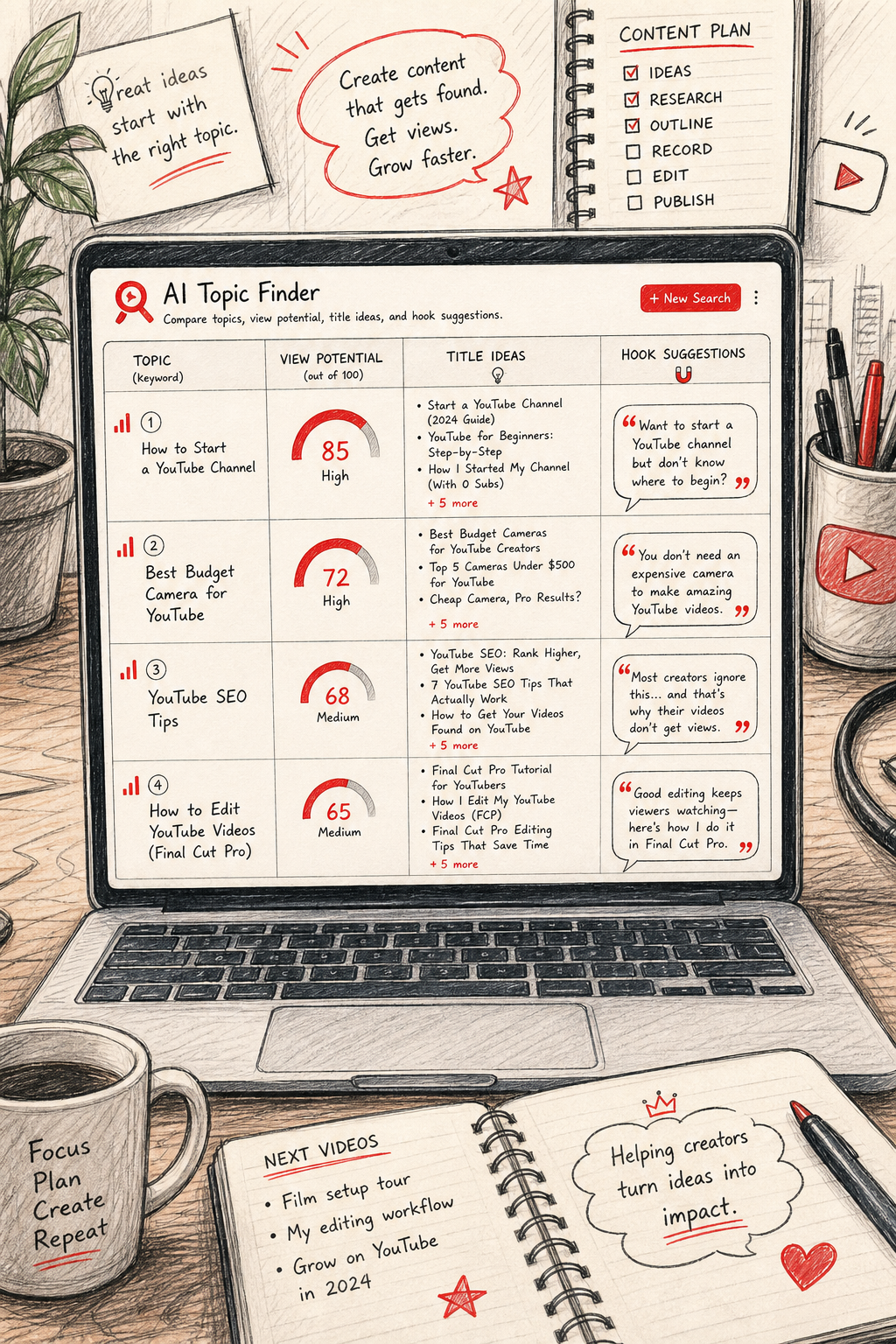
4. AI Topic Finder, Tailored niche topics with a comparison table
The AI Topic Finder scans your niche, pulls data from top‑performing videos, and surfaces gaps you can fill. It’s especially handy for businesses that want to avoid re‑hashing the same content as everyone else.
After you input a primary keyword, the tool returns a list of sub‑topics, each with an estimated view potential, suggested title structure, and a brief hook idea.
Below is a side‑by‑side comparison of the core metrics against two other popular AI generators.
Imagine you run a small landscaping company. The tool might suggest “DIY Low‑Water Gardens for Urban Balconies”, a topic that’s underserved on video platforms but aligns perfectly with your service offering.
Pro tip: Export the CSV, add a column for “Production Cost”, and rank ideas using a simple RICE score (Reach, Impact, Confidence, Effort). This turns raw data into a prioritized content pipeline.
When budgeting matters, Velio’s Cheapest Video Ideas Tool article walks you through low‑cost alternatives and free‑tier tricks.
5. AI video builder Idea Hub , Easy drag‑and‑drop concepts for busy owners
The AI video builder is built for creators who prefer a visual canvas over code. Its Idea Hub takes a blog post, a LinkedIn article, or even a simple bullet list and converts it into a storyboard with suggested visuals, music, and timing.
For a small e‑commerce brand, you can paste a product description and instantly get a 60‑second video that showcases key features, uses AI‑suggested stock footage, and adds on‑screen text that matches your brand fonts.
Highlights:
- Drag‑and‑drop interface that requires no editing experience.
- Library of royalty‑free media that updates weekly.
- AI‑driven text summarization that turns long copy into punchy captions.
Limitations:
- Customization beyond the preset templates can be limited.
- Export quality caps at 1080p on the free plan.
Best practice: Use the AI video builder for “quick‑turnaround” content like product teasers or event recaps. Pair it with a more strong script generator for longer, evergreen pieces.
6. AI Idea Engine, Automatic Repurposing Suggestions
The platform shines when you already have long‑form assets, webinars, interviews, or podcasts. Upload the video, and the AI extracts key moments, creates concise highlight reels, and suggests new titles that capture the essence of each clip.
This is a goldmine for small businesses that want to maximize the ROI of a single piece of content. A 30‑minute webinar can become three 2‑minute short clips, a 5‑minute social Reel, and a blog‑post summary, each with its own SEO‑friendly headline.
Core advantages:
- Time‑saving: No manual editing needed to find the best 10‑second moments.
- AI‑generated captions improve accessibility and SEO.
- Batch processing lets you repurpose an entire library in one go.
Potential drawbacks:
- Audio quality of the source video still matters; noisy recordings may produce inaccurate transcripts.
- Some niche visuals may need manual replacement if the stock library doesn’t match your brand.
Use case: A local gym recorded a 45‑minute Q&A session. The tool sliced it into six bite‑size videos answering common fitness myths, which together drove a 22 % increase in newsletter sign‑ups over the following month.
7. AI Avatar Prompt Lab, Voice‑over script ideas with AI avatars
The platform lets you generate realistic AI avatars that speak any script you write. The Prompt Lab helps you craft those scripts by suggesting dialogue variations, tone adjustments, and even multilingual translations.
Small businesses can create consistent brand‑personas without ever stepping in front of a camera. For example, a boutique travel agency can have a friendly “tour guide” avatar introduce each destination video, keeping the visual style uniform across all uploads.
Key perks:
- Over 160 language options, great for reaching global audiences.
- Customizable avatars that reflect your brand colors and logo.
- Instant rendering: a 2‑minute video renders in under 30 seconds.
Things to consider:
- While the avatars are lifelike, some viewers may still prefer a human face for highly personal topics.
- Pricing scales with the number of generated minutes, so keep an eye on usage.
According to the platform’s own documentation, the service complies with GDPR and SOC 2 Type II standards, which matters if you handle customer data in your videos.
Tip: Pair the avatar voice‑over with a visual storyboard tool for a smooth production pipeline.
8. AI Shorts Generator, Shorts‑first brainstorming for quick growth
Shorts are the fastest way to get discovered on short‑form video platforms in 2026. The AI Shorts Generator asks you for a seed keyword, then builds a 60‑second vertical video script, suggests punchy on‑screen text, and automatically formats the output for the Shorts aspect ratio.
For a local bakery, entering “coffee art” could produce a rapid‑fire tutorial: “3 Quick Latte Art Hacks in 45 Seconds”. The AI also suggests a hook line that appears in the first three seconds, a critical window for viewer retention.
Pros:
- Zero‑editing workflow, the AI adds transitions, music, and captions.
- Built‑in analytics to see which hooks drive the highest click‑through rates.
- Direct publishing to short‑form platforms from the app.
Cons:
- Creative control is limited to the template library.
- Export quality caps at 720p on the free tier.
Quick tip: Use the Shorts generated as teaser clips for longer‑form videos you produce with a video creation tool. This cross‑promotion can double the exposure of a single piece of content.
9. What to Look For When Choosing an AI Video‑Idea Tool
Not every AI tool fits every business. Here’s a checklist to help you decide which platform aligns with your goals, budget, and technical comfort.
- Data breadth: Does the tool pull from a large, up‑to‑date video library? Larger data sets mean more reliable trend detection.
- Keyword & competitor analysis: Tools that combine keyword volume with competitor gap analysis (like a leading video creation platform) give you a strategic edge.
- Export flexibility: CSV or API access lets you integrate ideas into your own content calendar.
- Creative output: Some tools stop at ideas; others (advanced video generation tools) generate storyboards or full‑rendered videos.
- Pricing model: Look for transparent monthly rates versus credit‑based systems.
- Compliance and security: If you handle customer data, choose platforms with GDPR or SOC 2 compliance.
For a concise overview of the video platform’s rules, see the video platform Wikipedia page. Understanding community guidelines can prevent your AI‑generated thumbnails or titles from being flagged.
When you weigh these factors, you’ll spot the sweet spot between automation and creative control, the place where most small businesses see the biggest lift.
To compare pricing and feature depth across the market, Velio’s Video Ideas App Review offers a side‑by‑side matrix that’s updated for 2026.
Conclusion
AI has turned the video‑idea grind from a monthly headache into a quick brainstorming session. Whether you need raw keyword ideas (keyword research tool), full scripts (script generation tool), visual storyboards (visual storyboard tool), or ready‑to‑publish Shorts (shorts creation tool), there’s a tool that fits your budget and skill set. The key is to treat the AI output as a starting point, add your brand’s voice, and test performance in real time.
Start by picking one of the tools above, run a pilot video, and track the core metrics, views, watch time, and click‑through rate. Refine your prompts, feed the results back into the generator, and you’ll build a self‑reinforcing loop of data‑driven content.
Ready for the next step? Check out Velio’s guide on building a sustainable video platform content calendar and turn those AI‑generated ideas into steady channel growth.
FAQ
What is the best AI tool for generating video ideas for a small retail shop?
For a small retail shop, a keyword research tool’s AI Idea Generator offers a quick way to surface keyword‑rich topics with built‑in search‑volume data. Pair it with a script generation tool to turn those topics into scripts, and you’ll have a complete workflow that stays within a modest budget. The free tier of the keyword research tool is generous enough to test a few ideas before committing to a paid plan.
Can I use these AI tools without any video editing experience?
Yes. Drag‑and‑drop video creators and shorts creation tools are designed for users who prefer intuitive interfaces and automatic formatting. The drag‑and‑drop creator lets you drop text and choose from a library of stock footage, while the shorts creation tool builds short videos in under a minute. For more polished productions, the visual storyboard tool offers guided editing even for beginners.
How do I ensure the AI‑generated ideas align with my brand voice?
Start by defining a clear brand tone (e.g., friendly, professional, quirky) and feed that description into the script generation tool for the first draft, adjust any generic phrasing, and keep a style guide handy. Over time the AI learns from your edits and produces outputs that feel more on‑brand.
Are there any free AI tools that still provide useful video ideas?
While many premium platforms offer deeper data, you can get decent results from free tiers of keyword research tools and script generation tools. Additionally, using the video platform’s built‑in autocomplete and search trend services can surface high‑interest topics without cost. Combine those manual insights with a free storyboard sketch in the visual storyboard tool’s demo mode for a zero‑budget workflow.
What metrics should I track to measure the success of AI‑generated videos?
Focus on four key numbers: total views, average watch time (as a percentage of video length), click‑through rate on the thumbnail, and conversion actions (such as website clicks or newsletter sign‑ups). Log these in a simple spreadsheet, compare against baseline videos, and iterate on the AI prompts that produced the highest performers.
How often should I refresh my video‑idea list?
Trends shift quickly, especially in niche markets. Run a quick idea‑generation session at least once a month, or more often if you’re in a fast‑moving industry like tech gadgets or fashion. Use the RICE scoring method to prioritize fresh ideas and retire low‑performing topics.