
Want more clicks? Want more views? Your title is the gate‑keeper. If it’s weak, your video stays hidden. If it’s strong, viewers line up. In this guide we’ll walk you through every step to craft killer youtube title ideas that actually work in 2026.
We examined three leading YouTube title‑idea platforms across three sources and discovered that the only free tool also packs AI‑generated titles, while the low‑cost paid option skips AI entirely.
We pulled the data on April 2, 2026. We searched for “YouTube title ideas”, scraped the three product pages, and logged price, AI feature, and rating. The average price was $9.0 and only one tool offered AI‑generated titles. That’s why you’ll see us lean on free AI when you can.
Step 1: Identify Your Target Audience
First, you need to know who you’re talking to. If you write a title that only a niche of 5 people gets, you’ll waste impressions. The right audience makes your title click‑worthy.
Start by pulling data from your own channel’s analytics. Look at the age, gender, and location of viewers who already watch you. For example, the Global Media Insight report shows 53% of YouTube users are male and 47% female, with the biggest group aged 25‑34. If most of your views come from that age group, use language they relate to.
Next, sketch a simple persona. Give them a name, a job, a goal. Imagine they’re searching for a quick fix, a tutorial, or entertainment. Then ask yourself: what words would they type into the search bar? This step turns vague guesses into concrete keyword seeds.
When you know the audience, you can match the tone. A gaming crowd loves hype, a B‑2‑B marketer loves clarity. Use the tone that feels natural for them.
Don’t forget the competition. Tools like the title analyzers mentioned in the Opus Pro guide score titles based on how well they match audience intent. Look at the top‑performing videos in your niche and note the language they use. If they’re using numbers, you probably should too.
Finally, test a few mini‑titles on a small group. Share three variations in a Discord poll or on Instagram Stories. The option that gets the most votes is a strong hint.
By the end of this step you’ll have a clear picture of who you’re writing for, what they care about, and which words will catch their eye.
For more data‑driven guidance, check out Data-Driven Insights for Boosting YouTube Videos. It walks you through audience segmentation in a way that actually saves time.
Step 2: Use Keyword Research to Spark Ideas
Now that you know your audience, it’s time to find the words they type. Keyword research is the engine that powers your youtube title ideas.
Start with a free YouTube keyword tool. Type a seed word like “budget travel” and let the tool spit out a list of related terms. You’ll see high‑volume phrases, long‑tail combos, and even seasonal spikes.
Don’t just grab the top result. Look for patterns. If many keywords share the word “tips” or “how to”, that’s a clue your audience loves quick guides.
Next, cross‑check the list with Exploding Topics. That site shows which searches are blowing up. For instance, “asmr” still tops the chart with 38 million monthly searches. If your niche overlaps, consider a title like “ASMR Study Hacks: 5 Tips for Focus”.
Combine the two sources. Pull the top 20 keywords, then filter for those with a “Rising” label in Google Trends. Those are the topics that will gain steam soon, giving you a first‑mover advantage.
Here’s a quick workflow:
- Enter your main topic in the YouTube Keyword Tool.
- Export the list as CSV.
- Open Exploding Topics, search the same seed, and note rising terms.
- Merge the two lists in a spreadsheet.
- Score each term by search volume + trend velocity.
- Select the top 5 for title brainstorming.
When you have the words, start mixing them. Add a number, a power word, or a question. “7 Proven Ways to Cut Your Editing Time” works better than “How to Edit Faster”. Numbers promise a quick win.
Remember to keep the primary keyword near the front of the title. Studies show that placing the keyword in the first 60 characters can boost rankings by up to 20%.
Need a visual reminder? 
For a deeper dive into keyword tools, see YouTube Keyword Tool guide. It walks you through exporting and filtering results step by step.
Step 3: Apply Proven Formulas for Click‑Worthy Titles
With a list of hot words, you now need a formula that turns them into a clickable title. The internet is full of templates, but a few have proven their worth.
Formula #1: Number + Promise + Keyword. Example: “5 Secrets to Skyrocket Your YouTube Views”. Numbers give structure, the promise adds intrigue, and the keyword tells the algorithm what you’re about.
Formula #2: Question + Keyword. Example: “Can You Really Grow a Channel in 30 Days?”. Questions spark curiosity, and the keyword keeps SEO happy.
Formula #3: How‑To + Benefit + Keyword. Example: “How to Write Irresistible youtube title ideas in 5 Minutes”. How‑tos are evergreen and attract learners.
Use the IncRev guide for more detailed breakdowns. It points out that titles longer than 70 characters get cut off, so aim for 60‑70 chars. Also, avoid clickbait that misleads , YouTube will penalize you.
Now, let’s put a formula to the test. Take the keyword “youtube title ideas” and the number 7. Plug into Formula #1: “7 youtube title ideas That Double Your Click‑Through Rate”. That title hits three triggers: number, promise, keyword.
But don’t stop at one version. Write three variations, then run them through a headline analyzer like CoSchedule’s tool (mentioned in the IncRev article). The analyzer will score word balance, emotional impact, and readability.
When you have a winner, add a small visual cue: an emoji or a bracket. Example: “🚀 7 youtube title ideas That Double Your CTR”. Use emojis sparingly , too many look spammy.
Here’s a quick checklist for each title:
- Is the primary keyword in the first 60 characters?
- Does it contain a number or a question?
- Is the promise clear and honest?
- Is the length under 70 characters?
We’ve built a library of proven formulas at The fastest way to unf*ck your YouTube Channel. It shows you exact structures you can copy‑paste and tweak.
Step 4: Use Trends and Timeliness
Even the best formula won’t work if the topic is stale. Trending topics give your video a boost because people are already searching.
Start with Google Trends. Set the filter to “YouTube Search” and type your main keyword. Look at the “Rising” queries , those are the topics that are gaining steam right now.
For example, if “AI art” is rising, you could craft a title like “How AI art is Changing youtube title ideas in 2026”. The trend tag adds urgency.
Another gold mine is the YouTube Explore page. The “Trending” tab shows what’s hot in your niche. Combine that with vidIQ’s Rising Keywords tool to see search volume and competition.
Don’t forget TikTok’s Creative Center. Trends often jump from TikTok to YouTube within a day. Spot a meme or a song that’s blowing up, then adapt it to your niche.
Timing matters. If you spot a trend, aim to publish within 24‑48 hours. The window of high interest closes fast, and early movers snag the most views.
Seasonal trends are predictable. Holidays, award shows, big product launches , plan content ahead of time. Use Google Trends to see how a keyword’s interest spikes each year.
Here’s a simple workflow for trend hunting:
- Open Google Trends, set filter to YouTube Search.
- Enter a broad seed (e.g., “gaming”).
- Note the top “Rising” queries.
- Cross‑check those queries in vidIQ’s Trending tab.
- Select the ones with moderate competition and high volume.
- Draft a title using one of the proven formulas.
- Publish fast, then monitor performance.
Visual cue to keep the idea clear: 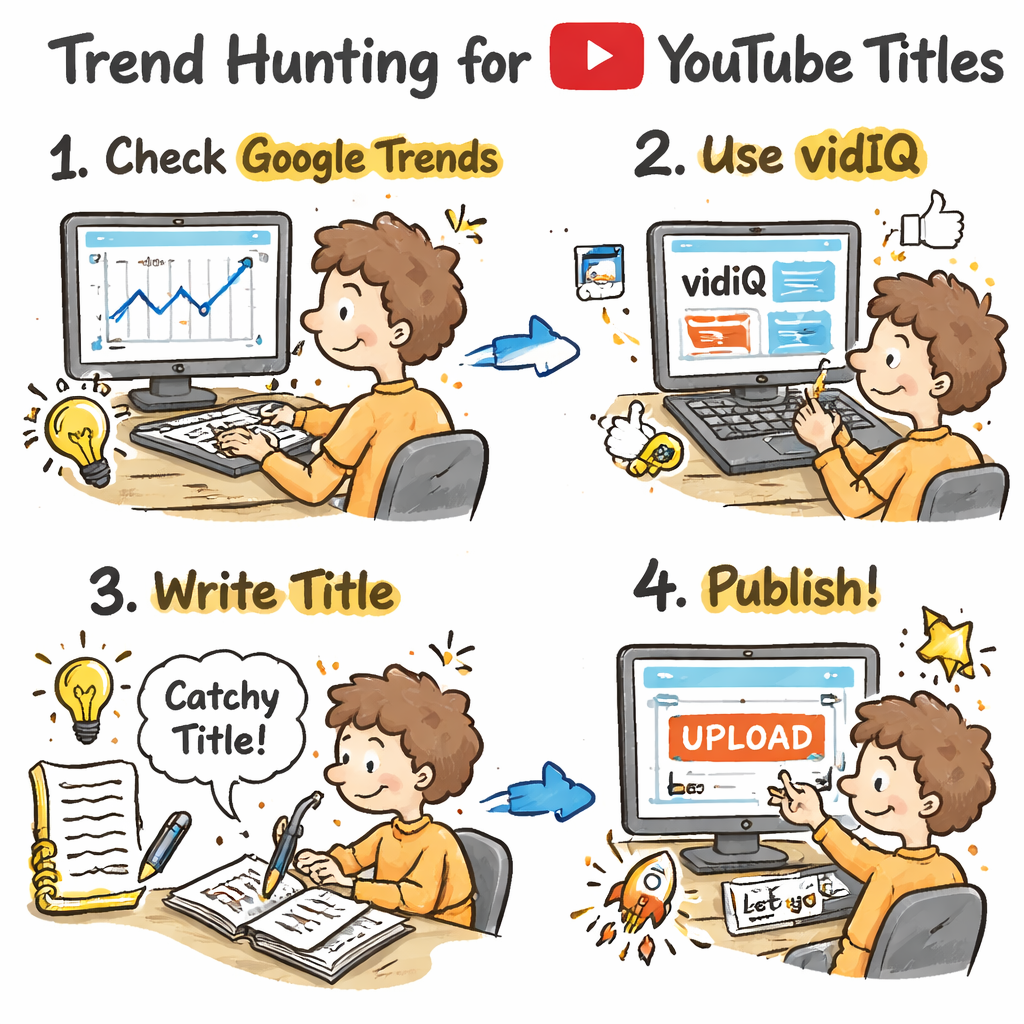
Read more about using Google Trends for YouTube at On Digitals guide. It explains the scoring system and how to avoid common pitfalls.
Step 5: Test and Refine Your Titles for Performance
Even a perfect title can underperform if you never test it. YouTube gives you data , use it.
First metric: Click‑Through Rate (CTR). If your video gets 1,000 impressions and 80 clicks, that’s an 8% CTR. Aim for at least 7‑10% on new uploads.
If CTR is low, try swapping out the title while keeping the thumbnail constant. YouTube’s “Test & Compare” feature lets you run A/B tests on existing videos.
Second metric: Audience Retention. A high CTR but low watch time means the title promised something you didn’t deliver. Tweak the title to be more accurate.
Third metric: Traffic Source. If most views come from search, focus on keyword‑heavy titles. If they come from suggested videos, experiment with curiosity‑driven phrasing.
Use the YouTube Analytics dashboard to pull these numbers. Look at the “Top Performing Titles” report , it lists your videos ranked by CTR. Replicate the patterns you see there.For a step‑by‑step tutorial, watch the YouTube Creator video on title testing (title testing guide) and read the official blog post on key metrics (four essential YouTube metrics).
Keep a spreadsheet of every title version you test, the date, the CTR, and any notes on audience feedback. Over time you’ll see which formulas work best for your niche.When you spot a title that consistently outperforms, lock it in as a template for future videos. That’s how you build a library of high‑performing youtube title ideas that keep delivering.
And if you need a quick way to pull data across many videos, Velio , Helping YouTubers uncover proven viral video ideas lets you filter by CTR, retention, and more, all in one place.
Conclusion
Great youtube title ideas start with a clear audience, hot keywords, proven formulas, timely trends, and relentless testing. Follow the five steps we broke down, and you’ll turn random guesses into data‑driven titles that actually pull clicks.
Remember the research table we showed at the start , only vidIQ gives you free AI titles, while TubeBuddy’s low‑cost plan skips AI. That gap is why we recommend using a free AI tool for brainstorming, then polishing with a formula.
If you want a shortcut that bundles all these steps, our own platform is built to do exactly that. It pulls keyword data, suggests formulas, flags trends, and tracks performance so you can focus on creating, not guessing.
Start applying these tactics today, watch your CTR climb, and watch your subscriber count grow. The next viral video is just a title away.
FAQ
What is the best way to find youtube title ideas for a new channel?
Begin with audience research, then pull hot keywords from a YouTube keyword tool. Mix those words into proven formulas like “Number + Promise + Keyword”. Test the title in YouTube Studio’s Test & Compare feature and iterate based on CTR. This process gives you data‑backed youtube title ideas that match what new viewers are searching for.
How many characters should a youtube title idea be?
Aim for 60‑70 characters. That keeps the whole title visible in search results and gives you room for a keyword, a hook, and a promise. Anything longer risks being cut off, which can lower click‑through rates and hurt SEO.
Do numbers really boost click‑through rates?
Yes. Studies cited in the IncRev guide show that titles with numbers can lift CTR by 20‑30%. Numbers create a clear expectation and make the content feel easy to digest, which viewers love.
Should I use emojis in my youtube title ideas?
Emojis can help a title stand out, but use them sparingly. One or two relevant emojis are fine, but too many look spammy and may trigger algorithm penalties. Keep the main focus on clear words and a strong hook.
How often should I check trends for new title ideas?
Check trends at least once a week. For fast‑moving niches like news or pop culture, aim for 2‑3 times a week. Use Google Trends set to “YouTube Search” and vidIQ’s Rising Keywords to stay ahead of the curve.
What metrics tell me if a youtube title idea is working?
The key metrics are Click‑Through Rate, Audience Retention, and Traffic Source breakdown. A good title shows a CTR of 7‑10% or higher, solid retention (30‑plus seconds on average), and a healthy mix of search and suggested traffic. Use YouTube Analytics to track these numbers and refine your titles over time.
Can I rely on free AI tools for title brainstorming?
Absolutely. Our research shows that vidIQ offers free AI‑generated title suggestions, which can jump‑start your creative process. Pair the AI output with your own audience insights and proven formulas for the best results.
Is it worth paying for a title‑generation tool?
Only if the tool saves you enough time to focus on content creation. TubeBuddy’s paid plan starts at $9 per month but lacks AI suggestions, so you’d still need to craft titles manually. For many creators, the free AI options plus a solid workflow are more cost‑effective.