
How to Create a YouTube Video Idea Spreadsheet Template
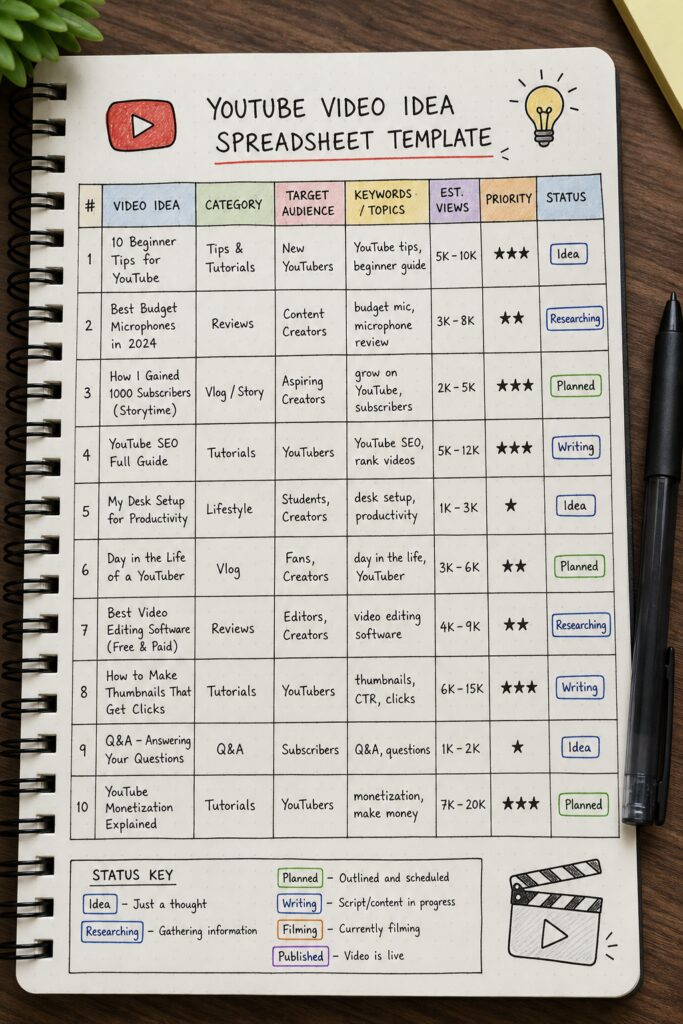
You want to grow on YouTube, but you keep running out of ideas. Or you have ideas but they’re scattered in notes, texts, and random documents. That’s a recipe for burnout. The fix? A simple YouTube video idea spreadsheet template that organizes your thoughts, tracks your progress, and makes sure you always have a solid plan. In this guide, we’ll show you exactly how to build one from scratch. You’ll learn the columns you need, how to generate ideas that actually stick, and how to keep the whole system alive and growing. By the end, you’ll have a template you can copy and use forever. Table of Contents Step 1: Identify Your Content Pillars Step 2: Set Up Spreadsheet Columns and Structure Step 1: Identify Your Content Pillars Before you open a spreadsheet, you need to know what you’ll cover. Content pillars are the big topics your channel is built on. Maybe you’re a tech channel with pillars like “gadget reviews”, “tutorials”, and “industry news”. Maybe you’re a fitness channel with “workouts”, “nutrition”, and “mindset”. Think about your niche. What are the 3 to 5 core themes your audience cares about most? Write them down. These pillars will be the backbone of your YouTube video idea spreadsheet template. Here’s how to find your pillars: Look at your most popular videos. What topics do they share? Search your niche on YouTube. What categories do competitors focus on? Ask your audience. A simple poll can reveal what they want. Once you have your pillars, you’ll use them to group every idea. That makes it easy to see if you’re covering all your bases or ignoring a key area. Pro Tip: Keep your pillar list short. Three to five is enough. Too many pillars will make your spreadsheet feel chaotic. Now, open a new Google Sheets or Excel file. Name it something like “YouTube Video Idea Spreadsheet Template”. In the first sheet, create a column for “Pillar” at the front. Later, you’ll fill that in for every idea using our YouTube video idea research checklist. Bottom line:Your content pillars give your YouTube video idea spreadsheet template structure and ensure you always have ideas aligned with your channel’s focus. Step 2: Set Up Spreadsheet Columns and Structure Now let’s build the actual template. You need a set of columns that capture everything about a video idea. Here’s the core list: Video Idea Title: A working title for the video. Pillar: Which pillar does this belong to? Keywords: Primary keyword(s) you want to rank for. Target Audience: Who is this for? (e.g., beginners, advanced) Estimated Value: High, Medium, Low based on potential views or revenue. Status: Idea, Planned, Scripting, Recording, Editing, Published. Deadline: When do you plan to publish? Notes: Any extra details, references, or links. [IMAGE: A doodle-style illustration of a spreadsheet table with rows and columns, each cell labeled with column headers like “Video Idea Title